Configure HEAT Capture
Settings are edited in the application’s settings pages. Every edit is written to
C:\ProgramData\VRAI\HEATCapture\UserConfig.json, and that file is watched, so most changes apply
immediately. The tables below mark the settings that need a restart.
appsettings.json in the install directory holds the shipped defaults. It is not watched and is
replaced on upgrade, so make deployment changes in the application or in UserConfig.json, not
there.
Configuration is layered. Later layers win:
appsettings.jsonin the install directoryheat.modules.json, install directory thenC:\ProgramData\VRAI\HEATCaptureUserConfig.jsoninC:\ProgramData\VRAI\HEATCapture- Command-line overrides in the form
--Section:Key=value
Platform connection
| Setting | Type | Default | Effect | When to change |
|---|---|---|---|---|
HEATSettings:HEAT_URL | string | https://dev.heatvr.io/ | Base URL of the HEAT platform instance sessions are created against | Always, at deployment time. The shipped value is a VRAI development instance |
HEATSettings:TemplateID | integer | -1 | HEAT template the session is created from | When your platform administrator gives you a template id |
HEATSettings:InputNodeID | integer | -1 | HEAT input node data is delivered to | With the template id |
Changing HEAT_URL at runtime recreates the platform connection and signs the current user out.
It also stops undelivered sessions recorded against the previous URL from being replayed: replay
only runs when a stored session’s platform URL matches the configured one.
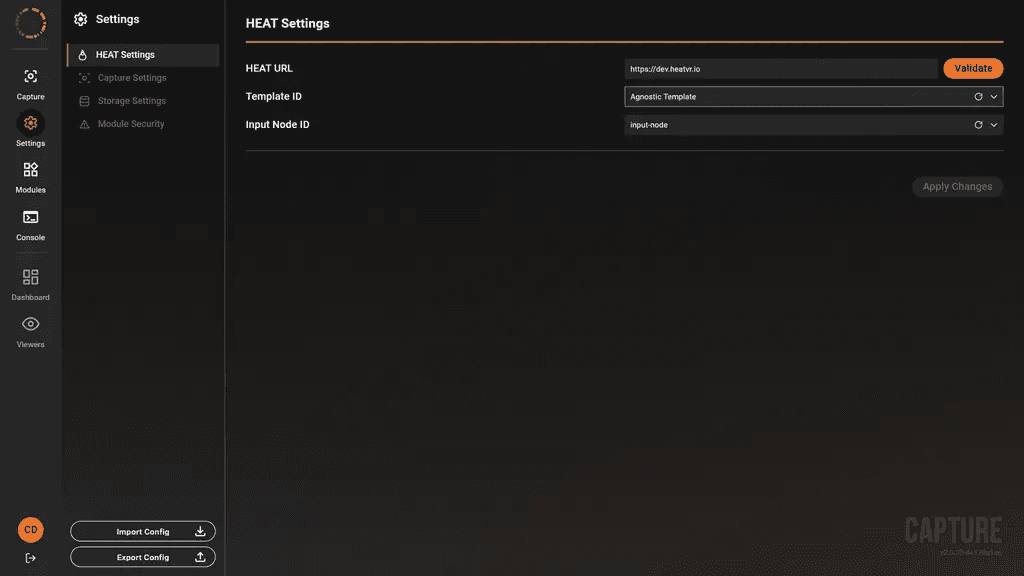
Platform connection settings, with the URL validated and the template and input node resolved to names.
Embedded web server
The application hosts its own HTTP server for the user interface and the API.
| Setting | Type | Default | Effect | When to change |
|---|---|---|---|---|
WebSettings:Host | string | 0.0.0.0 as shipped in the desktop application | Interface Kestrel binds. localhost or 127.0.0.1 binds loopback only; any other address binds that address; empty binds all interfaces | Set to localhost unless a second machine genuinely needs access |
WebSettings:Port | integer | 5005 as shipped in the desktop application | HTTP port | On a port clash |
WebSettings:EnableHttps | boolean | false | Adds an HTTPS listener with a self-signed certificate generated into ProgramData | When a remote browser must reach the interface |
WebSettings:HttpsPort | integer | 0, meaning Port + 1 | HTTPS port | To pin the port |
All four need an application restart. They are read once, before the web server starts.
The desktop application ships bound to 0.0.0.0, so its interface and API are reachable from any
machine that can route to the workstation. Most API endpoints perform no authentication. Bind to
localhost, or restrict the port with a host firewall rule, before deploying on a shared network.
The installer does not create any firewall rule.
Two behaviours worth knowing before enabling HTTPS:
- The HTTPS listener always binds every interface, whatever
Hostsays. Enabling HTTPS on a loopback-bound deployment exposes the application to the network. - If the resolved HTTPS port is outside 1 to 65535, or equal to the HTTP port, the HTTPS listener is skipped and HTTP stays up. The log records the reason.
Capture
| Setting | Type | Default | Effect | When to change |
|---|---|---|---|---|
SimulationSettings:CaptureSessionName | string | Default Session | Session name shown in the application and on the platform | Per exercise or trial |
SimulationSettings:CaptureType | Simulation, Automatic, Manual | Manual | Whether a session is linked to a simulation run and who starts it | Simulation when the simulator drives the session |
SimulationSettings:MachineSimulationGroup | integer | 1 | Groups concurrent simulations across machines | Multi-machine exercises |
SimulationSettings:TimeWindow | duration | 1 minute | Window in which further participants may join the session | Larger for staggered starts |
SimulationSettings:StartSessionBeforeSimulation | boolean | false | Starts the session before launching the simulator | Applies only when CaptureType is Simulation |
SimulationSettings:SimulationName | string | empty | Simulation name reported to the platform | Applies only when CaptureType is Simulation |
SimulationSettings:SimPath | string | empty | Executable the application launches as the simulator | Applies only when CaptureType is Simulation |
SimulationSettings:Language | enum | English | Interface language. Available: English, French, Italian, German, Spanish | Operator preference |
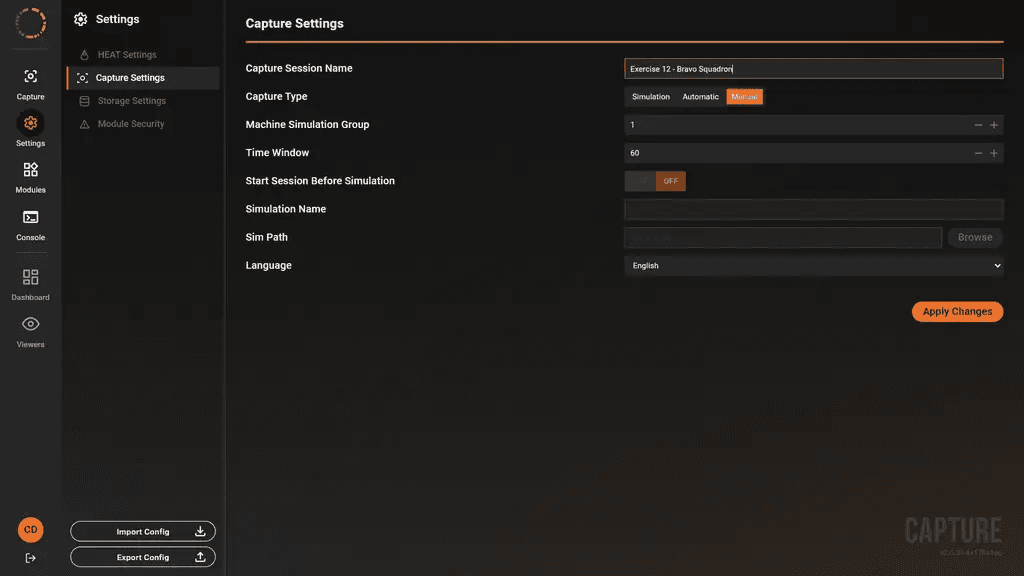
Capture settings, with an example session name and Manual capture type.
Changing the language reloads the interface.
Capture store
The capture store is the on-disk buffer every packet passes through before delivery.
| Setting | Type | Default | Effect | When to change |
|---|---|---|---|---|
StorageSettings:BaseDirectory | string | HARDStore | Store location. A relative value sits under C:\ProgramData\VRAI\HEATCapture. An absolute path is used only if writable, otherwise the default is used | To record onto a dedicated data drive |
StorageSettings:MinimumFreeSpaceBytes | bytes | 5368709120 (5 GiB) | Capture will not start below this, and a running capture is stopped | Rarely. Lower only with a deliberate risk decision |
StorageSettings:WarningFreeSpaceBytes | bytes | 21474836480 (20 GiB) | Low-disk warning threshold | To warn earlier on large exercises |
StorageSettings:FreeSpaceCheckIntervalMs | integer | 1000 | Free-space poll interval | Rarely |
StorageSettings:MaxSegmentBytes | bytes | 536870912 (512 MiB) | Size at which the store rolls to a new segment | Rarely |
StorageSettings:MaxBundlePacketsCount | integer | 400 | Packets per upload bundle | Tuning delivery with VRAI |
StorageSettings:MaxBundleSize | bytes | 10366976 (about 9.9 MiB) | Size limit per upload bundle | Tuning delivery with VRAI |
StorageSettings:MaxBundleRetries | integer | 10 | Delivery attempts before a bundle is parked for the next launch | On a link with long outages |
StorageSettings:RetryBackoffMs | integer | 250 | First retry delay | Tuning delivery with VRAI |
StorageSettings:RetryBackoffMaxMs | integer | 5000 | Retry delay ceiling | Tuning delivery with VRAI |
StorageSettings:AppendQueueCapacity | integer | 32768 | Packets that may await writing. When the queue fills, capture stops instead of dropping data | Rarely |
Session backup
An optional local copy of session data, separate from the capture store.
| Setting | Type | Default | Effect | When to change |
|---|---|---|---|---|
SessionBackupSettings:Enabled | boolean | false | Enables local session backup | When you need a local archive independent of the platform |
SessionBackupSettings:BackupPath | string | C:\SessionBackups | Root directory; each session gets its own subdirectory | Always, if backup is enabled: point it at a data drive |
SessionBackupSettings:MinFreeSpaceBytes | bytes | 2684354560 (2.5 GiB) | Backup stops below this | Rarely |
SessionBackupSettings:FreeSpaceCheckIntervalMs | integer | 1000 | Free-space poll interval | Rarely |
SessionBackupSettings:CompressOnSessionEnd | boolean | true | Compresses the session directory when the session ends | Set false if you post-process the raw files |
Module trust
| Setting | Type | Default | Effect | When to change |
|---|---|---|---|---|
ModuleSecurity:AllowUnsignedModules | boolean | false | Allows modules without a trusted signature to load | When building or testing your own module, on a development or evaluation workstation. Modules whose signature is invalid are refused whatever this is set to. Not currently licence-gated |
This setting needs a restart. The application reports that when you change it.
Module sources and policy
The Modules section defines where module packages come from and what may be installed. It is
read once at startup, so every key here needs a restart.
| Setting | Type | Default | Effect |
|---|---|---|---|
Modules:Repositories | list | empty | Package sources. The installer writes one entry for the VRAI curated registry when you supply a token |
Modules:RequiredModules | list | empty | Modules installed, and optionally updated, automatically at startup |
Modules:EnforceAllowedModules | boolean | false | Restricts installation to Modules:AllowedModules |
Modules:AllowedModules | list | empty | The allowed module names |
Modules:AllowPackageMutations | boolean | true | false blocks all install, update and uninstall |
Modules:RequirePackageSignatures | boolean | true | Requires a package signature |
Modules:StrictPrereleaseMatching | boolean | false | Whether prerelease versions satisfy a version requirement |
For a locked-down workstation, set EnforceAllowedModules to true with an explicit
AllowedModules list, and set AllowPackageMutations to false once the workstation is
provisioned.
Each installed module has its own settings section, including an Enabled flag. Module settings
apply live and are pushed to the running module. See the page for the module in question.
Import a deployment configuration
Most customer deployments receive a VRAI-prepared .hcz file rather than a Module Library token.
The HEAT Configuration Zip contains merged application settings, package metadata and the approved
module directories. Import it from Settings using Import Config.
Import is a replacement, not a merge: it backs up the current state, replaces the current settings
and all installed modules, and requires a restart. The package must contain settings.json and
metadata.json; the upload limit is 512 MiB. The exported package format version at this product
ref is 1.0.
The package excludes the installed-package manifest and removes the module-repository authentication token from exported settings. A customer package therefore does not need or carry a Module Library token unless separate registry access is configured after import.
Settings that need a restart
- Everything under
WebSettings ModuleSecurity:AllowUnsignedModules- Everything under
Modules - Any value set only in
appsettings.json - Importing a configuration package
Everything else applies as soon as it is saved. Installing, updating and removing a module apply to the running application and need no restart. See Modules.
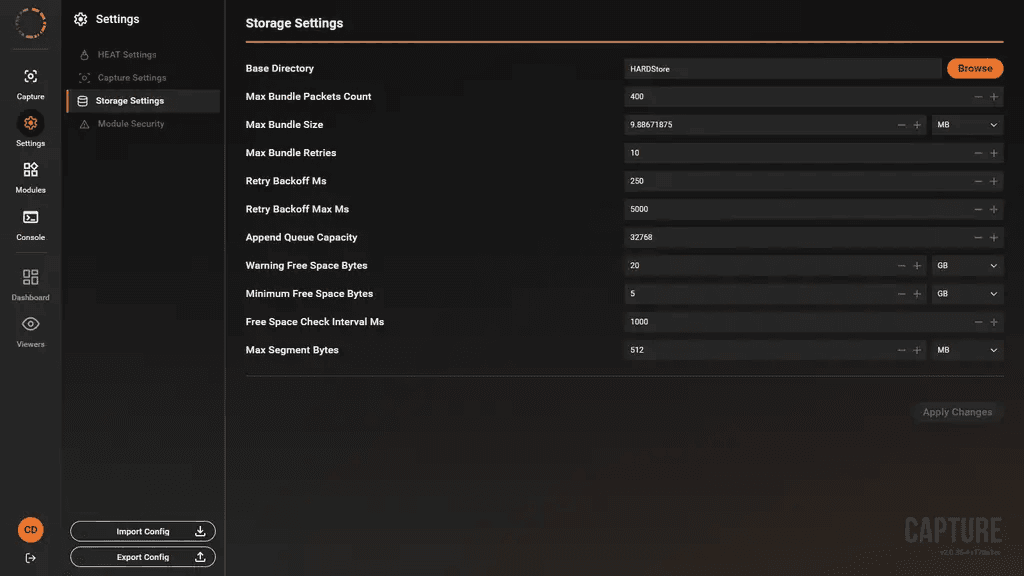
Storage Settings at the documented defaults.